Showing posts with label Data Types. Show all posts

Sunday, 6 October 2013

Float Data Type

Float Data Type


The float is the second most commonly used data type used in C and allows you to store decimal numbers.
You can use float data types to store results of operations involving a division operation. Before we start with an example lets learn more about it.

Why is float 4 Bytes long ?


As you may remember int is only 2 Bytes long(for 16 bit CPU, 4 Bytes for 32 bit CPU). So what makes float so special to require twice the amount of space?

In a decimal number, its important to know the position of the decimal point. Consider this example:
129 < 1290  , but 1.29 = 1.29. Similarly 1.29 < 12.9.

The placement of the decimal point decides the value of the number and this is done in the following manner.
Lets consider 3.141592 as an example.

This number can be written as 3141592 x 10-5. This value is separated as 3141592 and -5.
3141592 is called the exponent, -5 the mantissa. The compiler then makes use of these values and encodes the float representation using the IEEE 754 standard.

As we need to store the information of two integers to represent a single float it requires twice the amount of space. and hence 4 Bytes of memory.


Lets continue with the example to know more about float.

/*
    Author: Ryan Sequeira
    Title:  Float data type formatting
*/

#include <stdio.h>

int main()
{
    float n = 22.0f, d = 7.0f;
    float pi = n/d;
    
    //print the value of pi
    printf("The value of Pi: %18f\n", pi);    
    
    //print the first 2 decimals of pi
    printf("Pi with first 2 decimals: %5.2f\n", pi); 
    
    //print the first 20 decimals of pi
    printf("Pi with first 20 decimals: %.20f\n", pi);
    
    /* float prints 6 decimal places by default 
    and gives a accuracy upto 20 decimal places. */
    
    //print the first 25 decimals of pi
    printf("Pi with first 25 decimals: %.25f\n", pi);
  
    return 0;
}

Lets  understand how formatting works with float.

float output for %5.2f
We use %5.2f to print the above result. In this example 5 represents the number of places to reserve for the decimal and .2 represents the number of decimal digits to output.

The number before the decimal point ( in %5.2f ) represents minimum number of blocks to reserve for the value, and the number after the decimal decides the number of places to round off the decimal.

You can try this with integers too. But since there isn't a decimal here you can only use an integer value between % and d.

Example  printf("%5d",100); will reserve 5 blocks for the value 100. You can use this formatting option to right align your results.

Now that we have learnt a lot about float lets write a small program that converts temperature in Fahrenheit to Celsius and Kelvin.

/*
    Author: Ryan Sequeira
    Title:  Program to convert temperature in
            Fahrenheit to Celsius and Kelvin
*/

#include <stdio.h>

int main()
{
   //declaring variables to store temperatures 
   float far = 0.0f;
   float cel = 0.0f;
   float kel = 0.0f;
   
   printf("Enter the temperature (in Fahrenheits): ");
   scanf("%f",&far);
   
   //formulas to convert Fahrenheit to Celsius 
   cel = (far - 32) * (5.0f/9.0f);
   
   //formula to convert Fahrenheit to Kelvin
   kel = (far + 459.67f) * (5.0f/9.0f);
   
   printf("%.2f Fahrenheits equals \n %7.2f Celsius and \n %7.2f Kelvin\n", far, cel, kel);
   
   return 0;
}


Float in a nutshell
Description Used to store decimal values. They can be negative, zero and positive.
Examples -273.987, 76.0f, 0.00, 180.45, 3.1423
Size 4 Bytes (may change based on system)
Range -3.4e38 to +3.4e38
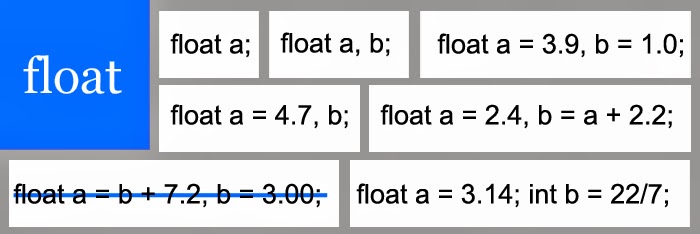
Syntax float variable ( = value) [, var1 = val1, ...] ;
Format Specifier %f

Int Data Type

Int Data Type


Int Data Type is one of the most commonly used data types and used to store integer values. They can be negative, zero or positive.
For example: 2, 56, -8663 etc.

Lets look at an example on how integers can be used.

 
/*  
 Author : Ryan Sequeira  
 Date : 22nd September 2012  
 Title : Calculate the age difference between two people
*/ 

#include<stdio.h>

int main(){
    //declaring 2 variables and initializing it with 0 
 int a = 0, b = 0;
 
 //prompting to enter age of first person and storing it in a
 printf("Enter age of first person: ");
 scanf("%d", &a);
 
 //prompting to enter age of second person and storing it in b
 printf("Enter age of second person: ");
 scanf("%d", &b);
 
 //printing the age difference
 printf("The age difference is: %d", abs(a-b));
 
 return 0;
}

In this simple example you can see how variables are declared, initialized, re initialized with users value and finally used to calculate new results.

Here we have initialized the variables with 0. It is always a good practice to initialize variables with appropriate values. For example if a program will use the variables to add or subtract, 0 is the value to be used and for multiplication and division operations you can use 1.

We have used the abs function in this example. The abs function is used to calculate the absolute difference between 2 values i.e it returns only the difference and not the positive or negative sign.


Int in a nutshell
Description Used to store integer values. They can be negative, zero and positive.
Examples -45, 38, 0, 1445, -9753
Size 4 Bytes (may change based on system)
Range -32768 to 32767
Syntax int variable ( = value) [, var1 = val1, ...] ;
Format Specifier %d

Data Types and Variables in C

Data Types in C


Now that you know how to take inputs from users, lets understand what Data-Types are, as they determine the kind of input and output out program can handle.

What are Data Types ?


A data type or simply type is a classification, identifying one of various types of data, such as real-valued, integer or character. 
  • It determines the possible values for that type; 
  • The operations that can be done on values of that type; 
  • The meaning of the data
  • And the way values of that type can be stored.


The basic data types in c are:
  • Int
  • Float 
  • Char

A complete list of data types is given below


KeywordVariable TypeRange
charCharacter (or string)-128 to 127
intInteger-32,768 to 32,767
short
short int
Short integer-32,768 to 32,767
longLong integer-2,147,483,648
to 2,147,483,647
unsigned charUnsigned character0 to 255
unsigned intUnsigned integer0 to 65,535
unsigned shortUnsigned short integer0 to 65,535
unsigned longUnsigned long integer0 to 4,294,967,295
floatSingle-precision
floating point
(accurate to 7 digits)
±3.4 × 10-38 to
±3.4 × 1038
doubleDouble-precision
floating point
(accurate to 15 digits)
±1.7 × 10-308 to
±1.7 × 10308

What are Variables and how are they related to data types?


Variables are used to store values temporarily in your program. The life span of a variable can be at most equal to the time the program executes.
As the compiler needs to know what type of data is to be stored (different data types are stored differently as different operations can be performed based on the data type) we assign a data type to each variable.
The syntax to create variables is variable name followed by one or more variables, separated by comma. You can also initialize each variable in the same statement. Also as variables are declared from left to right you can use the value of the variable on the left to assign current variables' value.

Example:  int a = 9, b = 2*a;
                  this way a=9 and b=18

Lets understand each data type in detail.
  • Understanding integer data type.
  • Understanding float data type.
  • Understanding character data type.