Showing posts with label Archive. Show all posts

Thursday, 1 November 2012

Chapter 13 - Nested Conditions( Using nested If ... else...) [Part 3 of 3]


Last thing u need to know about IF .. ELSE

The two concepts discussed here are 
  1. Nested blocks
  2. Indentation
Both of which can be emphasized with a single example, given below 


/*  
 Author : Ryan Sequeira  
 Date : 19thth October 2012  
 Title : Program to find the limits
*/  

#include<stdio.h>
#include<conio.h>


void main()
 {

  float num=0, u_lt=0, l_lt=0;
  
  clrscr();

  //prompt the user to enter the upper limit
  printf("Please enter the upper limit :");
  scanf("%f",&u_lt);

  //prompt the user to enter the lower limit
  printf("Please enter the lower limit :");
  scanf("%f",&l_lt);

  //prompt the user to enter a number
  printf("Enter a (decimal) number : ");
  scanf("%f",&num);

  //nested if else

  //number less than upper limit
  if(num <= u_lt)
    {
        //number greater than lower limit 
        if(num >= l_lt)
            printf("\n%f number is within the limit",num);

        else
            printf("\n%f number is less than the lower limit",num);
    }
  else
     printf("\n%f number is greater than the upper limit",num);


  getch();
 }


In the following example multiple if 's can be thought of as using multiple filters. 
The first filter checks if the upper limit is satisfied and only then proceeds with the inner block.
The second filter then checks the lower limit.

Using this logic you can place as many if's one inside the other. Also you can pair them with their respective else s to handle failed conditions. The general syntax for nested if else is given below.


if (condition) 
 {

    if (condition) 

           ........... 

    else

          ...........

}


The most important thing in nesting is the arrangement of the code. It is called Indentation.


Indentation:

Indentation is not a requirement of C programming language. Rather, programmers indent to better convey the structure of their programs to human readers. In particular, indentation is used to show the relationship between control flow constructs such as conditions or loops and code contained within and outside them.


The idea here is to arrange the code belonging to the along (same) vertical line .
In order to get used to this, use a tab every time you create a block i.e. after typing a brace bracket '{'.

Previous Post     Next Post

Wednesday, 17 October 2012

Chapter 12 - Adding Conditions (Using If ... else...) [Part 2 of 3]


In the first part we learned how to deal with conditions and how to execute a block of code only when a certain condition is fulfilled

In this chapter we will deal will what we can do if a condition is false.
For this we will make use of the else block.

Take a look at the image above. The flow chart shows how the execution of the program proceeds in either cases. 

Note: It is important to know that it is not necessary to use an else block for every if statement and should be used only when necessary. 
Also the placement of the else block will make a lot of difference.  You will learn about this after we deal with "nested if... else..."

Lets implement a small program to implement if else.

/*  
 Author : Ryan Sequeira  
 Date : 17th October 2012  
 Title : Program to check if number is odd or even
*/  

#include<stdio.h>
#include<conio.h>

void main()
 {

  int num=0;

  clrscr();

  //prompt the user to enter a number
  printf("Enter a number : ");
  scanf("%d",&num);

  //out if else block to handle even or odd cases
  if(num % 2 == 0)
   printf("\n%d number is even",num);
  else
   printf("\n%d number is odd",num);


  getch();
 }

Note that you can skip the parenthesis ( the brackets {}) if you have a single line of code inside if or else

Now that we can handle both if and else cases the next thing to do is, to move ahead with the types of conditions we can use.

We will learn how to implement more complicated (multiple) conditions with some simple examples

The three important notations one are:

  1. &&
  2. ||
  3. !
These are called Boolean operators and each of these has a meaning and should be used carefully.

It took me some time to figure out a robust example that any one (not having knowledge of Boolean logic) could understand.

So the example we are going to be using is the number line example. We will also make use of images to visually illustrate the examples.


First the && (AND) operator

Condition 1:  num > 3
Condition 1:  num < 5
Result:  num > 3 && num < 5


which means the number has to be both greater than 3 and less than 5.

Implementation:

if(num > 3 && num < 5)
     {
          printf("Number Accepted");
     }
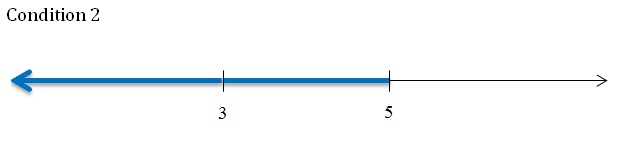
Second the || (OR) operator


Condition 1:  num < 3
Condition 1:  num > 5
Result:  num < 3 || num > 5


which means the number has to be either less than 3 or greater than 5. 
Also it can be both condition 1 (less than 3) and condition 2 (greater than 5) , but in this example it is not possible

Implementation:

if(num < 3 || num > 5)
     {
          printf("Number Accepted");
     }

And then the ! (NOT) operator

Here we will us the same 2 conditions from 'And' example and 'Not' the result

Value:  Not (condition/conditions)
Result:  !(num > 3 && num < 5)


so !{(condition 1) && (condition 2)}  translates to NOT ( greater than 3 and less than 5 ) 
which means the number should not be greater than 3 and less than 5.
These are all the values that would have been considered false by the same condition without '!' not operator.

Implementation:

if(!(num > 3 && num < 5))
     {
          printf("Number Accepted");
     }


Important Observation

Not (con1 AND con 2)  = Not (con1) OR Not (con2)

In this example
!(num > 3 && num <5) 
= !(num  > 3) || !(num < 5 )
= (num < 3) OR (num  > 5)   ...........    (This is the result of OR example)

We can compare the 2 results to prove it:


I have tried my best to explain multiple conditions with Boolean operators, but if you still have any doubts or suggestions feel free to comment.


Thursday, 4 October 2012

Chapter 11 - Adding Conditions (Using If statement) [Part 1 of 3]


From this tutorial on wards everything you learn will exponentially add up to your capability of programming. Hence make sure what ever you learn here, learn it correctly.

To be a good programmer one has to be confident with the basics. So go through each and every concept again and again till you are can confidently use them when you need them.

Also try to put to use all that you have learned so far, it will always help you fresh with what you have learned.


So lets start with knowing how conditions work

Knowing the Syntax 


if (condition) 
{

   ...........

   ........... 

}


Lets understand this using simple examples in english
  1. If your percentage is above 40 you pass
  2. If your age is above 18 you can vote
  3. If you ran a distance 42 km you have completed the marathon
  4. If a number is divisible by 2 it is even
  5. If you press 'y' you can proceed 
Now that we have our examples the first thing we are going to do is break them into 2 parts. First the condition and the the action.


Condition
Action
Percentage greater than 40
You pass
Age is above  18
You can vote
Ran a distance of 42 km
You completed the marathon
Number divisible by 2
It is even
You press ‘y’
You can proceed


Now that we know how to break the statements into conditions and actions the next part is to know how to implement comparisons progmatically.


   Operator name    
 Syntax 
Equal to
a == b
Not equal to
a != b
Greater than
a > b
Less than
a < b
Greater than or equal to
a >= b
Less than or equal to
a <= b 


Note: '==' stands for comparison and '=' stands for assignment. 
Example :-    a == b compare a is equal to b, where as
                      a =  b means copy value of b in a. 

It is important that you learn to  make this distinction early on as a misinterpretation leads to a lot of errors.
Also every comparison operator returns an integer value 0 or 1. 1 for true and 0 for false.

I have written a small program to illustrate this concept

/*  
 Author : Ryan Sequeira  
 Date : 4th October 2012  
 Title : Program to illustrate the truth values of comparison operation 
*/  

#include<stdio.h>
#include<conio.h>

void main()
 {
  //using two values to compare
  int a=5, b=10;
  int result=0;

  clrscr();

  //comparison returns 0 when false
  result = a == b;
  printf("The result of comparison when false: %d",result);

  //comparison returns 0 when true
  result = a < b;
  printf("\nThe result of comparison when true: %d",result);

  getch();
 }

How the If statement works 

Every If statement requires a condition, and the code written in the if block is executed only of the comparison returns true, i.e 1.


This program is an simple example to show how "If statement" works. To illustrate the point i have written a complete code for only one of the five examples discussed above. Below this code are code block you can replace to implement other examples.

/*  
 Author : Ryan Sequeira  
 Date : 4th October 2012  
 Title : Program to check if one has passed
*/  

#include<stdio.h>
#include<conio.h>

void main()
 {

  int marks=0, pass_val=40;

  clrscr();

  //prompt the user to enter his percentage out of 100
  printf("Enter your marks (out of 100):");
  scanf("%d",&marks);

  //compare the result to the passing value
  if(marks >= pass_val)
   {
    printf("\n+---------------------+");
    printf("\n|                     |");
    printf("\n| You passed the exam |");
    printf("\n|                     |");
    printf("\n+---------------------+");
   }

  getch();
 }

The code block for other examples are : 
 
 if(age >= 18)
 {
  printf("You can vote"); 
 }


 if(run_distance > 42)
 {
  printf("You completed the marathon"); 
 }


 if(number%2 == 0)
 {
  printf("The number is even"); 
 }


 if(key == 'y')
 {
  printf("You can proceed"); 
 }


This is a three part tutorial, the other two will each extend the concepts you have learned in the previous part.

Sunday, 23 September 2012

Chapter 10 - Taking input from User

Until now all you did was assigned values to the variables and printed them.

In this tutorial we will learn to take input from the users. The syntax for scanning an input is similar to that of printf() function. Both pritf() and scanf() functions are defined withing stdio.h header 

The programs below will work in the following steps:
  1. We will first declare and initialize a variable .
  2. Take a value from the user and store it in our variable (this step will re initialize the value of that variable).
  3. Print the value stored in that variable.

In order to understand how each data type scans value (and also for future references) i have written 3 separate codes for each of the data types we have learned so far.

Note that the execution of the program stops when it encounters a scanf() function and does not proceed until the user enters some input

scanf() for 'int' data type: 

In the code below we will declare a number; say age then ask the user to enter his age.
To make the code interesting we will subtract his age from 2012 and print "You were born in ..."

/*  
 Author : Ryan Sequeira  
 Date : 23rd September 2012  
 Title : Calculates the Year of Birth 
*/  

#include<stdio.h>
#include<conio.h>

void main()
 {
  int age = 0,yob = 0;  // initialized the variabe to avoid errors

  clrscr();

  //prompting the user to enter age
  printf("Please enter your age: ");

  //scanf takes the input and stores it in variable age
  scanf("%d",&age);

  //calculate year of brith
  yob = 2012 - age;

  //printing the Year of Birth
  printf("\nYou were born in: %d", yob);

  getch();
 }

As you can see, the scanf() function has a similar syntax, the only difference is that you have to add '&' to prefix to the variable name. Like everything else this also has meaning. After we are done dealing with all the three data types i will explain the reason behind it. 

Now lets check the float data type.

scanf() for float data type: 

In this example we will write a code to convert distance in kilometers to miles. First we will declare a variable say distance. Scan the value from the user and store it in distance. then we will apply the following conversion to convert kilometers into miles.

1 Kilometer  =  0.621371 Miles

/*  
 Author : Ryan Sequeira  
 Date : 23rd September 2012  
 Title : Converts distance from Km to Miles 
*/  

#include<stdio.h>
#include<conio.h>

void main()
 {
  float km = 0.0, miles = 0.0;  // initialized the variabe to avoid errors

  clrscr();

  //prompting the user to enter distance
  printf("Please enter distance in kilmoeters: ");

  //scanf takes the input and stores it in variable km
  scanf("%f",&km);

  //calculate distance in miles
  miles = km * 0.621371;

  //printing the distance in miles
  printf("\nThe distance is miles is: %.2f", miles);

  getch();
 }

Nothing special to mention, the method to scan a float is similar to that of int and the '.2' between % and f is to display value only up to 2 decimal places . So 1 more data type to go before the explanation for '&' .


scanf() for char data type: 

All i could think of is a code that takes a character input and prints the ACSII value of it. We all have implemented this in the previous chapter, the only change here being, user gets to enter the character.

/*  
 Author : Ryan Sequeira  
 Date : 23rd September 2012  
 Title : Gives the ASCII code of the key entered 
*/  

#include<stdio.h>
#include<conio.h>

void main()
 {
  char ch = 'a'; // initialized the variabe to avoid errors

  clrscr();

  //prompting the user to enter a digit
  printf("Enter a digit: ");

  //scanf takes the input and stores it in variable ch
  scanf("%c",&ch);

  //printing the ACSCII value
  printf("\nThe ASCII value is: %d", ch);

  getch();
 }


The mystery behind '&'

I had said this in the first chapter that data (in computer) is stored in the memory and has an address associated with it. Writing & as prefix to variable name (i.e. &age, &ch, etc.) gives the address of the variable. When you declare a variable the compiler assigns it an address in main memory and hence when you take a value from the user you tell scanf to store it in the address which is given by & followed by variable name.

If you are unable to understand what i have explained or if you can provide a better explanation please comment and i will make the necessary changes.

Now that you have learned to take input from the users, there are a lot of things that you can do. Try out the things listed out in Activities

Activities


  1.  Try to implement all the programs given in the previous chapters, but make use of scanf to set the values of the variables used. 
  2.  Try to write a program that takes the marks of 5 subjects(store it in 5 variables) and the total marks (out of) from the user and calculates his/her percentage.
 By doing this you will be able to write an actual program, one which takes input from users, processes it and produces results.

Sunday, 16 September 2012

Chapter 9 - The Char Data Type

In the previous chapters we have learnt 2 Data Types, int and float.

Now its time to learn how to use the char (character) Data Type.
This data type is slightly different from what we have learned so far. The knowledge of character will help u later to store and print names.
By the end of this post i guarantee you that you will know all the basics of a character data type and capable of using it in your own program.

How do we use it ?

In our first code we will simply assign a value to a character data type and the print what we have stored.

/*  
 Author : Ryan Sequeira  
 Date : 16th September 2012  
 Title : implementing char data type
*/  

#include<stdio.h>
#include<conio.h>

void main()
 {
  char c = 'a';

  clrscr();

  //printing the character
  printf("The character is: %c", c);

  getch();
 }

It is evident from the code that you can't simply assign a character directly to a char variable.
  • The value must be enclosed in a ' ' (single quotes). 
  • Only one character can be assigned to a char variable. So dont  try something like this c = 'name' . This will return an error. Be patient, we will deal with full words later.

More on Character

You might be knowing that computer deals with only digital data ( i.e 0's and 1's ) which are represented collectively as numbers. So how does it store a character. 

To answer this question we must know that every character has a ASCII value assigned to it. The complete ASCII table is shown below. 


So whenever you press a key on your keyboard the computer records them as these values, and not as characters.

This leads us to our next question

How do we check the ACSII value of a char ?

The code below will do just that. 

/*  
 Author : Ryan Sequeira  
 Date : 16th September 2012  
 Title : implementing char data type 
    by assigning ascii value
*/  

#include<stdio.h>
#include<conio.h>

void main()
 {
  char c = 65;

  clrscr();

  //printing the character
  printf("The character is: %c", c);
  printf("\nIts ASCII value is: %d", c);

  getch();
 }

As you must have noticed you can assign an ASCII value to a character just as you assign a value to an integer.

Note : The value should be in the range of 0 - 127 , or else you will be assigning an illegal value which will lead to an error in your code.


Playing with the ASCII values

Now that you know that ascii values can be assigned like integers lets try to experiment with the logic. What i have done in the code below is incremented the ASCII value of char by 1.

/*  
 Author : Ryan Sequeira  
 Date : 16th September 2012  
 Title : implementing char data type 
*/  

#include<stdio.h>
#include<conio.h>

void main()
 {
  char c = 'a';

  clrscr();

  //printing the character
  printf("The character is: %c", c);
  printf("\nIts ASCII value is: %d", c);

  //increment the vale of c
  c = c + 1;
  printf("\n\nThe new value is : %c",c);
  printf("\nThe new ACSII value is: %d",c);

  getch();
 }

You can try incrementing it by 5 or 10, or multiplying it by 2. But make sure the value falls within the range of 0 - 127.


The Master code

What i have done in the code below is combined all the concepts we have learned in this tutorial so far and made a simple program. Try implementing it yourself and also make some changes to experiment with the results.

/*  
 Author : Ryan Sequeira  
 Date : 16th September 2012  
 Title : implementing char data type 
*/  

#include<stdio.h>
#include<conio.h>

void main()
 {
  char c = 'a';

  clrscr();

  //initial value of c
  printf("The value is: %c",c);
  printf("\nIts ASCII value is: %d",c);

  //assinging a value to char
  c = '%';
  printf("\n\nThe new value is: %c",c);
  printf("\nIts new ASCII value is: %d",c);

  //assigning an ASCII value to char
  c = 67;
  printf("\n\nThe latest value is: %c",c);
  printf("\nIts latest ASCII value is: %d",c);


  getch();
 }

Chapter 8 - The Modulus Operator

In the previous chapters i purposely skipped one important math operator. Its  called the Modulus or mod operator ( % ). Explaining this in the previous chapters would add to the confusion and hence i am writing a mini post for this special operator. In the time to come you will be using this quite often in  solving certain problems.

What does this Operator do ?

This operator returns the remainder of division. To illustrate its working look at the image below


  Here  7 % 2 will give an output of 1.

Similarly

  • 4 % 5 = 4
  • 12 % 3 = 0
  • 54 % 4 = 2 

Significance of this operator
  • Look and the results in each case and notice that the results ( i.e. the remainder is always less than divisor )
  • Also that if the divisor ( 3 in example 2) divides the dividend ( 12 ) then the output will be 0

Where can you use this operator
  • You can use this operator to determine whether a number (divisor) completely divides other number (dividend).
  • Extending this logic we can determine if a number is odd or even by using 2 as divisor.
  • You can also use this operator to reduce a number to some number less than the divisor
Example:   Consider large numbers like 12344.  Using 12344 % 5 you can reduce this number to 4. Similarly you can reduce 845 can be reduced to 0. 

This may not seem useful now but you may need to use this to solve certain problems.


Activities: 
  1. I have purposely skipped the code. So your first task is to write a simple code printing the result.
  2. Adjust the values of operand 1 and operand 2 two  and examine the result. 

Wednesday, 12 September 2012

Chapter 7 - Writing our own program


Now that we know quite a bit about programming lets try to mend some problems into our programs.
You all know that how using integer values to store (result of) a float neglects the decimal part. We can make use of this logic to separate the decimal part from the whole number.

What i mean to say is if you are given a number like 3.4563 write a program to separate the decimal part. So the program should only print 0.4563

For those who cant figure out the solution can use the code below.

/*  
 Author : Ryan Sequeira  
 Date : 12th September 2012  
 Title : implementing a complex equation
 with short hand
*/  

#include<conio.h>
#include<stdio.h>

void main()
 {
  float num=34.3345,result;
  int temp;

  clrscr();
  //our logic
  temp = num; // this will store the number without the decimal part
  result = num - temp; // this will subtract non decimal part

  printf("The decimal part is : %f",result);
  getch();
 }

I know you might be wondering y only one program. the thing is i got this idea for a simple program and wanted to share it. Without the knowledge of comparisons and loops there not a lot different that can be done, hence i have reserved a lot of fun practice programs after we learn a little more on programming.

Chapter 6 - Mathematical operations(part 1 of 2)


By now you must be confident with writing a c program and fully capable of printing the output in any given format. This chapter will teach you to incorporate mathematical operations to your code. This chapter will cover simple operations like addition, subtraction, multiplication and division.

The reason behind not dealing with advanced mathematical operations is that these are in the form of functions and require a tutorial on functions. Moreover C has so many advanced mathematical functions that it cannot be covered in a single chapter. What i can do in later chapters is teach you the method to use these advanced operations in your program with one or two examples and thus you can make use of any mathematical operation you want as per your requirement using the same procedure.

So lets begin with the tutorial

Lets start with variables 'a' and 'b' to store 2 values and we will be applying the 4 mathematical operations on them. To store the value of these  operations we will require a third variable called 'result'.

Any math operation will be of the form 
result = a (operator) b

Consider the examples

Addition:
4 = 3 + 1
Subtraction:
7 = 10 - 3
Multiplication:
42 = 7 * 6
Division
2.5 = 5 / 2

Note: In the first 3 examples the result of 2 integers will always be an integer but in case of division the result is a float (decimal) value. Hence when you write an expression in your program you need to determine what kind of variable is required to save the result in advance in order to avoid errors.

Try to determine the  answers of the given examples


  1. 3.5 + 1.4
  2. 1 - 0.56
  3. 0.0 * 1.0
  4. 5 / 3

Answers:

  1. The result will be a float
  2. The result will be a float
  3. Although the two numbers appear as decimal but they do not contain any fractional value ( just .0) hence you can store the result in an int 
  4. Although the 2 numbers are integers the division operation will yield a float hence the result will be a float
The program

/*  
 Author : Ryan Sequeira  
 Date : 12th September 2012  
 Title : prints the value of 4 mathematical operations
*/ 

#include<conio.h>
#include<stdio.h>

void main()
 {
  int a=23, b=12;
  int result;
  float divResult, fa=23.0, fb=12.0;

  clrscr();

  //adding two numbers
  result = a + b;
  printf("The result of addition is : %d", result);
  getch();

  //subtracting two numbers
  result = a - b;
  printf("\nThe result of subtraction is : %d", result);
  getch();

  //multiplying two numbers
  result = a * b;
  printf("\nThe result of multiplication is : %d", result);
  getch();

  //dividing two numbers
  divResult = fa / fb;
  printf("\nThe result of division is : %f", divResult);
  getch();
 }


Note: In the division operation to make the result accurate i have made use of float values as operands instead of integers ( although 23.0 and 12.0 are integers but they are stored in float data type) to get accurate results. If you replace them with integers a and b (instead of fa and fb) you will get a value of 1.0000 which is  incorrect.

There is a short hand way to print the results of the mathematical equations, but i recommend you to make a habit to store the results in a variable, just a good programming practice and it avoids errors.

printf("The result of addition is : %d", a + b);

printf("\nThe result of subtraction is : %d", a - b);

printf("\nThe result of multiplication is : %d", a * b);

printf("\nThe result of division is : %f", fa / fb);

So the new code looks like this
/*  
 Author : Ryan Sequeira  
 Date : 12th September 2012  
 Title : prints the value of 4 mathematical operations 
 with short hand
*/  

#include<conio.h>
#include<stdio.h>

void main()
 {
  int a=23, b=12;
  int result;
  float divResult, fa=23.0, fb=12.0;
  
  clrscr();
  
  //adding two numbers
  printf("The result of addition is : %d", a + b);
  getch();
  
  //subtracting two numbers
  printf("\nThe result of subtraction is : %d", a - b);
  getch();
  
  //multiplying two numbers
  printf("\nThe result of multiplication is : %d", a * b);
  getch();
  
  //dividing two numbers
  printf("\nThe result of division is : %f", fa / fb);
  getch();
 }


In this program we have simply used two operands , one operator and one value to store the result, but one can make use of more than one operators to form a mathematical equation.


Consider the equation:

In order to write this in our c program we will have to understand how this equation will get equated.
If we break this equation we can see that there are two operators and we can write the 2 operators individually.

So we can now combine them using parenthesis ( ) 
So our equation becomes: 

result = a /(a+ b) 

Lets make use of this equation in our program and see how it works. In order to determine if you have translated your equation correctly in the code you can solve it manually with some values and match them with the values returned by your code.


/*  
 Author : Ryan Sequeira  
 Date : 12th September 2012  
 Title : implementing a complex equation
 with short hand
*/  

#include<conio.h>
#include<stdio.h>

void main()
 {
  float result, a=23.0, b=12.0;
  
  clrscr();
  
  result = a / (a +b);
  printf("The result of our equation is : %f",result);
  
  getch();
 }

Activities:

  1. Try to change the data types for each mathematical operations and check the results
  2. Try to implement the following equations in  C


Hint: make use of multiplication ( a*a ) to calculate  squares

Tuesday, 4 September 2012

Chapter 5 - Implementing Float

From the previous chapter we learned how to use an integer using 3 steps
  1. declaring an int
  2. initializing an int
  3. using the value stored in the int
Now with this knowledge we will make use of float(decimal) values in our program.
Float stands for decimal or floating point value. Every value stored in float contains a decimal point.
In the last chapter i did not mention that a value from one variable can be used to initialize another variable. I have implemented this concept int the code below.

/*  
 Author : Ryan Sequeira  
 Date : 4th September 2012  
 Title : prints the value of 2 variables previous and current  
*/  

#include<stdio.h>  
#include<conio.h>  

void main ()  
 {  
  float current =10.123, previous=0.0;  
  clrscr();  
  printf("The current value is : %f", current);
  previous = current;
  current = 23.344;
  getch();
  printf("\n\nThe current value is: %f \nThe previous value is: %f", current, previous);
  getch();  
 }

What we learn from this code is
  1. variables can be used to initialize other variables
  2. variables can also be re initialized anywhere in the program
Here instead of using %d we make use of  %f  for float values. 

By default float shows 4 digits after the decimal point. To limit the number of digits after the decimal point we make use of %.3f.

Here .3 means  3 values after the decimal point. Hence we can make use of values 0, 1, 2, 3 or 4 only as 4 is the upper limit and negative values are not allowed obviously.

This is all there is to be learned about float, using the three steps specified above. The next chapter will show how we can make use of both integer and float values along with mathematical operators.

Activities


  1. Use the same code to to show only 2 digits after the decimal point.
  2. Implement a code with both int and float values.

Friday, 31 August 2012

Chapter 4 - Implementing the Int(integer)

Yes its Int and not IMP.
Int Data Type is one of the commonly used data types and used to store integer values. In the previous chapter i explained to you what an integer can store with examples. So by now it is clear what kind of data we want to store in our first int variable. So lets get coding.

There are 3 steps in using a variable in any program.Variable declaration, where the compiler is told you are declaring a new variable of type INT.
  1. Variable initialization, where you store some value in the variable.
  2. Actual use of variable.
Example: The example code with give u a clear picture of how the three steps are used in the program and how we ca store and retrieve values from our (int) variables.
/*  
 Author : Ryan Sequeira  
 Date : 31st August 2012  
 Title : prints the value of a variable  
*/  

#include<stdio.h>  
#include<conio.h>  

void main ()  
 {  
  int x;  
  x =0;  
  clrscr();  
  printf("The value of x is : x");  
  getch();  
}    
Download code

Line 1 is implements variable declaration.
Line 2 implements variable initialization.
Line 3 makes use of the value of x .

Run the code before you read further.
As you may have noticed this code doesn't print any number. This is because x is treated as a part of a sentence and not as a variable. Hence we need to tell the compiler to reserve that space for an integer which is done by using a special word which is %d . So now the actual printf statement is

 printf("The value of x is : %d", x);    

This can be translated as, reserve space for a int variable whose name is x. So the new code becomes:
/*  
 Author : Ryan Sequeira  
 Date : 31st August 2012  
 Title : prints the value of a variable  
*/  

#include<stdio.h>  
#include<conio.h>  
void main ()  
 {  
  int x =0;  
  clrscr();  
  printf("The value of x is : %d", x);  
  getch();  
 }
Download code

You ca see that i have made a few changes and here are some good practices that i want you all to follow to reduce errors. As you can see i have initialized the value of x where it is declared. The reason behind this is that if you forget to initialize your variable later it will create errors in your code and will take time to find the exact cause of error. Hence i recommend you to make a habit of initializing the variables when they are declared.

How to print Two int Variables ?
To print two variables we extend the same concept. Suppose that we have to variables

int x = 1, y =3;    

(Yes you can declare more than one variable of the same type is the same sentence but you have to use int keyword only once, i.e. at the start of the instruction)

So now the accompanying printf statement will be:

printf("The value of x is : %d \n The value of y is : %d", x, y);  

Note:

  • Changing the order of x and y in the print f statement will change the answer.
  • There number of %d should match with the number of integer variables.
  • The order in which different types of variables used inside " .... " must be the same outside. (You will understand what i mean later when we make use of different data types).


So the final code is:
/*  
 Author : Ryan Sequeira  
 Date : 31st August 2012  
 Title : prints the value of 2 variables in one printf  
*/  

#include<stdio.h>  
#include<conio.h>  

void main ()  
 {  
  int x =10, y=20;  
  clrscr();  
  printf("The value of x is : %d \n The value of y is : %d", x, y);  
  getch();  
 }
Download code
Activities

  1. Try to change the value of x after the first printf and print the new value.
  2. Try to print two or more variables each in a different printf.
  3. Try to print more than one variables in the same printf.

Wednesday, 29 August 2012

Chapter 3 - Variables and Introduction to Datatypes

In the previous chapter we learned how to format and print our output. Now that we are familiar with the printf() function we will move a step ahead. Those who have not mastered the printf() function please refer the previous chapter before continuing.

So what is a variable?

Consider the following sentence: There are 40 students in my class.
From this sentence we can say that there are exactly 40 students in the class.

Now consider this statement: There are 'x' students in the class.
The value of  'x' here can be any whole number(1,2,3... etc).

We use variables in our programs to store data and the values of these variables can be changed at any time.

Consider the following table. For different values of x we can print the same sentence, with the changing values.

X = 2
There are 2 students in the class
X = 5
There are 5 students in the class
X = 15
There are 15 students in the class
X = 30
There are 30 students in the class

How are Data Types related with Variables?

As x is a variable it can also store names, decimals and integers right.
Consider the following 3 sentences:

My name is Ryan
X = “Ryan”
I scored 65.5 % in the Exam
X =”65.5”
There were 15 passengers in the bus.
X = “15”

But another variation can be 

My name is 15
X = “15”
I scored Ryan % in the Exam
X = “Ryan”
There were 65.5 passengers in the bus.
X = ”65.5”

This has no meaning. Hence the data stored in the variable must be of a particular type. Therefore every time we create a variable we define the type of data that can be stored in the variable.
Hence for the above example the data types will be:

My name is Ryan
X = “Ryan”
 X is a Integer
I scored 65.5 % in the Exam
X =”65.5”
 X is a Float
There were 15 passengers in the bus.
X = “15”
 X is a String

Dont worry about the names, you will get used to them. We need to understand what each type means. Examples will clear all your doubts.

Data Types supported by C:
(Don't get scared by looking at the list and the numbers, it will all make sense afterwards)


They first column stands for the Data Type. The second column stands for the meaning and the third one for the range of values. The basic types are int , float and char , the remaining are rarely used and can be dealt with later on.

But why do all the Data Types have a range ?

As we know variables store information, and all the information stored in the computer requires memory. But we also know that our computer has limited memory. As the size of information increases  more memory is required. So we need to put a restriction on the size of information/data stored in the variable. Hence every data type has a fixed size and fixed range.

Remember, you need to Treat Every New Concept as an Opportunity to Improve and not as an Hurdle

1) Integer Data Type

Example: 1, 2, 0, -8, 5123, -8932, etc.
Description: Used to store integer values. They can be negative, zero and positive.
Range: -32768 to 32767
Size: 2 Bytes
Syntax: int x= 5;


2) Float Data Type

Example: 1.5621, 2.00, 0.435, -8.021, etc.
Description: Used to store decimal values. They can be negative, zero and positive.
Range: -3.4e38 to +3.4e38
Size: 4 Bytes
Syntax: float x= 5.43;


3) Character Data Type

Example: a, g, t, B, T, Z etc. Also 1, 2, 3 etc and symbols like +, %, # etc. But don't confuse these numbers with integers as we cannot apply any mathematical operations on them. It is just to print numbers. 
Description: Used to store a single Character. 
Range: -128 to +127 (ASCII values of characters)
Size: 1 Byte (notice the size difference between int and char)
Syntax: int x= 'c';  (always write the value inside single quote('))

 U might want to know how to store a name. I will answer it after some posts as it is an extension on Data Types and one needs to get familiar with these first before moving ahead.

Finally u might be exhausted reading a post this long and hence there wont be any tutorial. I recommend the student to be fresh before learning something new and hence end this post here.